Set Up an NPS SIP Through Abhipra: Choose a Contribution Frequency
A recurring contribution can make it easier to keep retirement saving in your budget. Before starting an NPS SIP, understand what the bank mandate authorizes, choose a frequency and amount you can maintain, and check that contributions are appearing in your NPS record. This guide covers the Abhipra route and the practical checks to make.

What an NPS SIP does
An NPS SIP is a way to arrange recurring contributions to your NPS account. Abhipra’s NPS bank mandate form supports a NACH/ECS/auto-debit instruction. It asks you to choose a debit frequency, amount, investment date and mandate period. The form also provides options to create, modify or cancel a mandate. Read the current form and the terms shown during setup; the bank may apply mandate-processing charges under its current schedule.
A recurring debit is a payment instruction, not a return promise. NPS contributions are invested according to the investment choices recorded for the account, and investment values can move with the market.
Match the cadence to your cash flow
The current Abhipra mandate form lists monthly, quarterly, half-yearly and yearly frequencies, along with an “as and when presented” option. The chart below converts the four regular frequencies into scheduled debit opportunities over a hypothetical full twelve-month period. The counts are calendar arithmetic, not historic payment data; they assume the mandate is active for the full year and exclude failed or skipped debits.
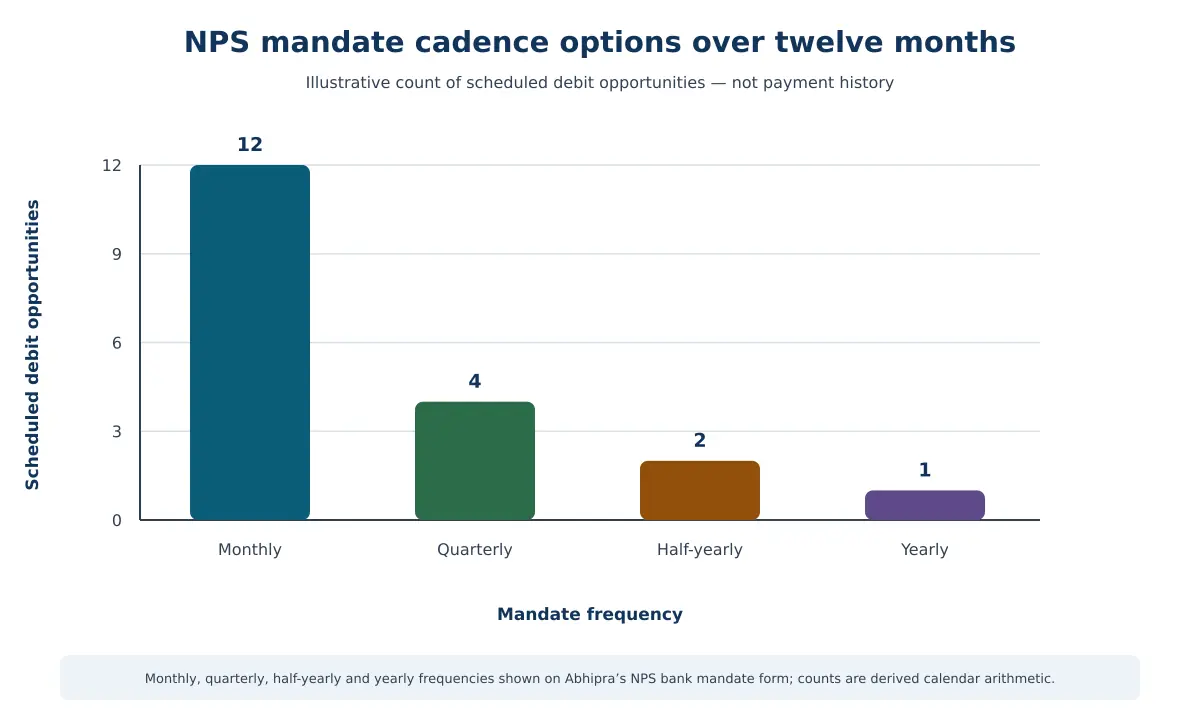
The horizontal axis shows the mandate frequency and the vertical axis shows the number of scheduled debit opportunities in twelve months. A monthly choice creates more frequent scheduled debits than a yearly choice. If you are targeting a similar annual contribution, less frequent debits usually require a larger amount each time. Choose based on your income pattern and ability to keep enough money in the linked bank account; the chart is not a recommendation.
Set up and monitor the mandate through Abhipra
- Have an NPS account and PRAN. If you have not opened an account, start with Abhipra’s NPS account-opening route.
- Start the SIP through Abhipra. Use Abhipra’s NPS SIP route and read the current instructions before entering details.
- Choose the instruction carefully. Set an amount, frequency, debit date and mandate period that fit your budget. Confirm the linked bank account and review any bank charges shown in its current schedule.
- Authorize and keep the record. Complete the required bank authorization. Save the application or mandate acknowledgement and check whether the bank has accepted the instruction. No processing time is promised here.
- Reconcile each contribution. Check the debit in your bank account, then review your NPS transaction record for the corresponding contribution and units. If a debit or credit is missing, check mandate status and contact Abhipra for assistance.
- Change or stop it deliberately. If your cash flow changes, use the current amendment or cancellation process. The mandate form says an instruction can be amended or cancelled by communicating with the user entity or the authorizing bank; confirm which steps apply to your mandate.
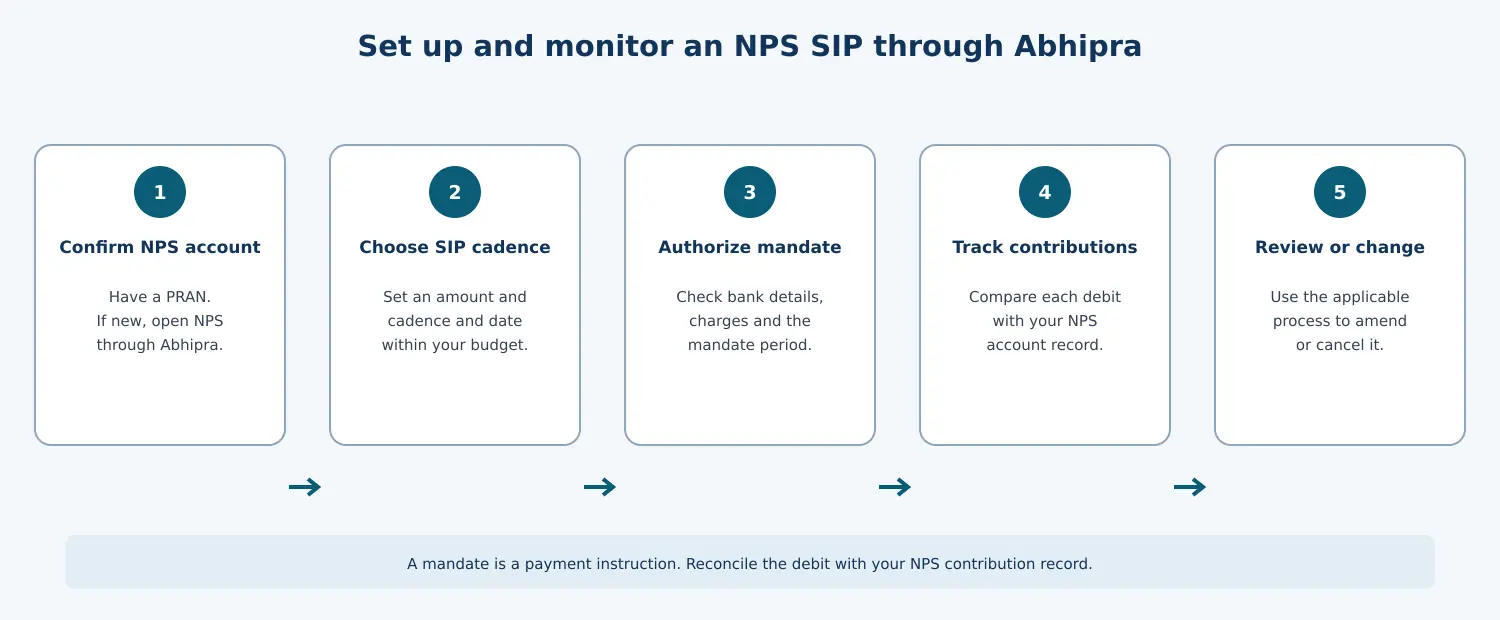
The workflow has no chart axes; it shows the setup and follow-up sequence. The key inference is that setting up a recurring instruction is only the first step: you should also monitor bank debits and confirm the contribution in your NPS record.
Keep the contribution sustainable
An SIP amount should fit after essential expenses and emergency savings. A missed bank debit can disrupt the routine, so avoid choosing an amount that depends on an uncertain future income. You can review the amount and frequency when your cash flow changes, subject to the current mandate process and NPS rules.
Abhipra has acted as a Point of Presence for 17 years and provides NPS account and contribution support. Read Abhipra NPS & Pension services for current service information.
Frequently asked questions
Does an NPS SIP guarantee that the debit will always succeed?
No. A bank mandate is an authorization. Debits can fail, for example, if the linked account has insufficient funds or the mandate is not active. Check the bank record and the mandate status.
Are the chart’s numbers actual NPS contribution data?
No. They are calculated from the monthly, quarterly, half-yearly and yearly frequency options shown on Abhipra’s mandate form. They show scheduled opportunities in a full year, not successful debits, contribution amounts, returns or account outcomes.
Can I stop or change my mandate?
Abhipra’s form includes create, modify and cancel instructions. Follow the current form and confirm the applicable process with Abhipra or your bank before assuming a change has taken effect.
Where can I start through Abhipra?
Use Abhipra’s NPS SIP route. If you still need an NPS account, use Abhipra’s account-opening route.
This article is for investor education and is not investment, tax or legal advice. NPS is market-linked and returns are not guaranteed. Review current scheme, bank-mandate and NPS disclosures before authorizing a debit.